What can go wrong with your A/R when switching medical billing companies?
Your open A/R keeps moving after you sign with a new company. Claims the outgoing company already submitted still draw denials, records requests and payments for months, and someone has to answer each one before the payer's deadline passes. The practice carries that risk, not the vendor: the Medicare enrollment application for physicians says that even with a billing agency, “you remain responsible for the accuracy of the claims submitted on your behalf” (CMS-855I, section 8).
Three gaps put that money at risk in a switch: old claims nobody is assigned to work, remittances still routed to the company you are leaving, and claim data you can no longer get once the contract ends. Each one is cheap to close before notice and expensive to close after.
How long can an unworked claim wait?
The filing limit sets how long a claim can sit before the payer can refuse it outright. Several national commercial and behavioral-health plans publish 90 days or less from the date of service; Original Medicare allows 12 months. The table shows each payer's published initial limit; your contract or state law can change it. Our guide to which payers give your practice the least time covers more plans, including state Medicaid programs.
| Payer and plan | Initial filing limit | Counted from | What can change it |
|---|---|---|---|
| Original Medicare (Part A and B) | 12 months (1 calendar year) | Date of service | Exceptions in 42 CFR 424.44(b) |
| Cigna, commercial | 90 days in network; 180 days out of network | Date of service | State law or your provider agreement |
| Humana, commercial | 90 days | Date of service | State mandate or your contract |
| UnitedHealthcare, commercial | Per agreement; at least 90 days in network | Date of service | Your agreement and state law |
| Optum Behavioral Health | 90 calendar days | Date of service | State or federal law, or the member's plan |
| Magellan Healthcare (behavioral) | 60 days under most contracts | Date of service | Your contract or a state mandate |
How do you tell whether it is time to switch, and where your A/R stands?
Switch on evidence, not frustration. Pull four numbers from your current company's reports for the last three months, using these definitions, before you talk to anyone new. A company that cannot produce them has answered the question for you.
- A/R days: total accounts receivable ÷ average daily charges. A rising trend means charges are turning into cash more slowly. The A/R days calculator turns three numbers from your aging and charge reports into one figure.
- Aged A/R: balances older than 90 days, by payer. Every month these claims sit, more of them reach a filing or appeal deadline.
- Denials waiting for work: denied claims with no correction, appeal or write-off decision yet, and how old each one is.
- Net collection rate: payments ÷ (charges − contractual adjustments).
The usual triggers are plain: reports that arrive late or without definitions, denials that sit without appeal, questions that go unanswered, and aged A/R that grows while charges stay flat. Read the trend against the billing KPIs to check every month rather than against a vendor's sales benchmark. If your company has stopped answering altogether, the first week looks different; a billing company that has gone quiet needs its own plan.
Who works your old claims after the switch?
The run-out is the period after your cutover date when claims submitted before it are still open. Name its owner in writing before notice goes out. Read your current contract first: it may already oblige the outgoing company to keep working its claims for a set period, and it says what that company charges on payments that post after you leave.
Whichever option you choose, give the run-out owner a dated list of open claims sorted by the deadline each one faces, and review status against that list every week until it is empty. Claims within 30 days of a deadline go first.
What if you are switching billing software or a clearinghouse instead?
Changing your practice-management system or clearinghouse creates the same run-out inside your own office. Keep read access to the old system until every claim sent from it is paid or closed, or move each open balance with its claim history and deadline, not just its amount. For Medicare, CMS lists “changing from direct submission to submission through a clearinghouse or changing from one billing agent to another” as changes after which your contractor may ask for a new EDI enrollment form (Medicare Claims Processing Manual, ch. 24). Ask the new vendor who will receive and post the ERAs for claims sent from the old system.
| Option | What it costs | Who does the work | What can go wrong |
|---|---|---|---|
| Outgoing company runs out its own claims | Its contract fee on payments that post during the run-out | The company that submitted the claims | Attention drops after notice; you depend on its reports until the last claim closes |
| Incoming team takes over all open A/R | Its fee for legacy claims; ask whether it differs from the new-claim rate | The new team, from the export it receives | Export lacks claim history or deadlines; old claims compete with new ones |
| Your staff work the old A/R | Staff hours, plus old system and clearinghouse access you keep paying for | Your biller or office manager | Old claims lose to daily work; deadlines pass unnoticed |
| Split by claim age or payer | Two fees, each on its own share of claims | Both companies, from one written list | A claim falls between the lists, or both work it |
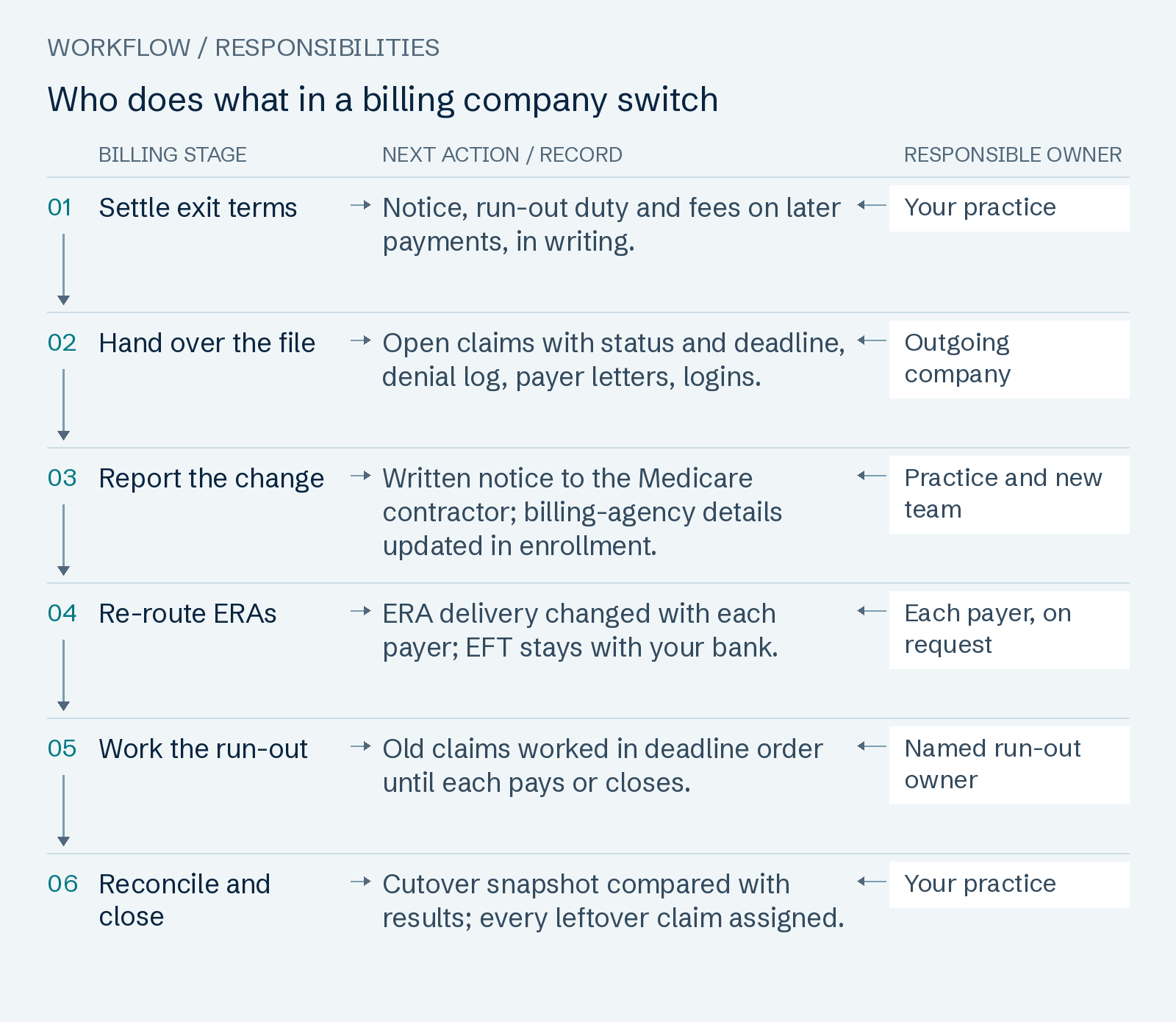
Read the workflow as text
- Settle exit terms — Notice, run-out duty and fees on later payments, in writing. Owner: Your practice.
- Hand over the file — Open claims with status and deadline, denial log, payer letters, logins. Owner: Outgoing company.
- Report the change — Written notice to the Medicare contractor; billing-agency details updated in enrollment. Owner: Practice and new team.
- Re-route ERAs — ERA delivery changed with each payer; EFT stays with your bank. Owner: Each payer, on request.
- Work the run-out — Old claims worked in deadline order until each pays or closes. Owner: Named run-out owner.
- Reconcile and close — Cutover snapshot compared with results; every leftover claim assigned. Owner: Your practice.
What should you secure before you give notice?
Everything below is easiest to get while the outgoing company is still under contract and still answering. Settle it in this order.
- Read the exit terms. Notice period, termination fee, run-out duty and the fee on payments that post after you leave.
- Request the handover file in writing. Every open claim with its status, last action and deadline; the denial log; payer correspondence; and the list of system logins, in a format your next team can open.
- Get the data before the contract ends. HIPAA requires a business associate contract to provide that at termination the vendor will, “if feasible, return or destroy all protected health information” it holds for you (45 CFR 164.504(e)). Agree on the return and its format before that clause applies.
- Take a dated A/R snapshot. Total open A/R, aged A/R by payer and the count of open claims on the cutover date: the baseline you reconcile the run-out against.
- Tell Medicare in advance. CMS instructs its contractors to tell providers that they “are obligated to notify their A/B MAC or CEDI in writing in advance” of a change in billing agent or clearinghouse, including the date they stop using the old one (CMS Pub. 100-04, ch. 24). Your Medicare enrollment also names the billing agency: section 8 of the CMS-855I for a clinician who bills in their own name, section 8 of the group's CMS-855B when benefits are reassigned to the group. 42 CFR 424.516(d) gives physicians, non-physician practitioners and their organizations 90 days to report enrollment changes other than ownership, adverse legal actions and practice locations (eCFR). Ask each Medicaid and commercial payer how it records a billing-agent change.
- Re-route ERAs payer by payer, as set out below.
- Remove the old company's access on the day its run-out ends, not before, and record who removed what.
How do you move remittances without moving your money?
ERA delivery is set up separately with each payer. CMS encourages providers to enroll for EFT and ERA “through each health plan with whom they participate” (CMS EFT and ERA operating rules), so a switch means one change request per payer, not one master setting. For Medicare, each provider that receives ERAs through a billing agent or clearinghouse signs an ERA enrollment form with its contractor.
Deposits are a separate matter. Medicare EFT sends payments “directly to a provider’s financial institution” (CMS EFT page), so changing billing companies changes who reads the remittance, not where the money lands. If a proposal asks you to move deposits into an account the billing company controls, stop and review it with your accountant and compliance adviser.
What does switching cost your practice during the transition?
The cost of a switch is mostly overlap: for a period you may pay the outgoing company on old claims and the incoming team on new ones. Check three things in writing.
- The exit bill: any termination fee, and the run-out fee on payments that post after your exit date.
- One fee per payment: name in both contracts which company is paid on a claim submitted before the cutover date, so no payment carries two fees.
- Internal time: the hours your staff spend on exports, logins, payer forms and the weekly run-out review.
Our own terms, for comparison: $0 setup. Inherited claims 90+ days past the date of service fall under A/R Recovery: 15% of the insurance payments that post after we work them, $0 on claims that never pay. Fee only on insurance payments posting after our logged action; patient payments 0%; full-service clients stay under the 9.0% fee cap. If you later leave us: Leave with 30 days' notice and no termination fee. Want a run-out? We keep working the claims we submitted for 90 days at your plan rate. Decline it and we charge nothing on payments that post after you leave. Notice by email; optional run-out covers claims we submitted before your exit date, at your plan rate; handover file within 10 business days of exit. Rates by specialty and practice size are on our rate card and contract terms.
When should you hand the switch to a billing team?
Hand the switch off when no one in your practice has the hours to chase a run-out list every week, or when your aged A/R is large enough that one missed deadline costs more than the fee. Our full-service medical billing takes over new claims and works inherited near-deadline claims first. Go-live, when your first claims go out, comes within 5 business days of access; any unbilled backlog follows within 10 business days of access. Clock starts with your signed agreement, signed BAA and working system logins; it extends day for day while we wait on access.
To size the risk before you decide, send a claim-level aging export and get every unpaid claim over 90 days, sorted by its deadline. Clock starts with your claim-level aging export and signed BAA; above 10 requests in a week, we confirm your date within 1 business day.
Common questions
- How long does switching medical billing companies take?
- Two clocks run at once. The outgoing side depends on your contract's notice period and how fast its export arrives, and the run-out lasts until the last old claim pays or closes; Original Medicare accepts claims up to 12 months after the date of service. On our side: Go-live, when your first claims go out, comes within 5 business days of access; any unbilled backlog follows within 10 business days of access. Clock starts with your signed agreement, signed BAA and working system logins; it extends day for day while we wait on access.
- Will our current billing company give us our data and A/R reports?
- Ask in writing before notice runs out. A HIPAA business associate contract must provide that at termination the vendor returns or destroys the protected health information it holds for you, if feasible (45 CFR 164.504(e)). Your contract sets format and timing, so agree on a claim-level export, the denial log and payer correspondence before the end date.
- Who gets paid on old claims that pay after we switch?
- Whoever the contracts name. Write down which company earns a fee on a payment for a claim submitted before the cutover date, so no payment carries two fees. Our billing company checklist lists the contract terms to compare before you sign.
- Do we have to tell Medicare we changed billing companies?
- Yes, for Medicare fee-for-service. CMS says providers must notify their contractor in writing in advance of a change in billing agent or clearinghouse. A clinician who bills Medicare in their own name also updates the billing agency in section 8 of the CMS-855I; a group updates section 8 of its CMS-855B. Physicians, non-physician practitioners and their organizations report enrollment changes other than ownership, adverse legal actions and practice locations within 90 days under 42 CFR 424.516(d). Medicaid and commercial payers set their own process.
- Can we switch billing software without losing open A/R?
- Yes, if every open claim keeps an owner and its history. Keep read access to the old system until claims sent from it close, or migrate each open balance with its claim history and deadline. Confirm where ERAs for old claims will land, and ask your Medicare contractor whether the change needs a new EDI enrollment form.
- Does our cash stop while ERAs are re-routed?
- Deposits should keep arriving if your EFT bank details stay the same: Medicare EFT pays your bank directly, not the billing company. What can lag is the remittance detail. Until a payer's ERA change takes effect, its ERAs may still reach the old destination, so ask the outgoing company to forward them or give the new team payer-portal access.
- What if our billing company has stopped answering?
- Then a planned switch is not available. Secure your payer-portal, clearinghouse and bank logins first and list the claims nearest their filing limits; a billing company that has gone quiet calls for a week-one plan, not a cutover date.
Sources and review
Page revised October 7, 2026 · Review contact: Hyder Shah (inquiries@claimpillar.com). Filing limits come from our timely-filing dataset, each value quoted from the payer's own document and retrieved 2026-10-02; your contract or state law can change them.
- CMS: Operating Rules, EFT and Remittance Advice
- CMS: Electronic Funds Transfer
- CMS: Medicare Claims Processing Manual, Chapter 24 (EDI)
- CMS-855I Medicare enrollment application (section 8, billing agency)
- CMS-855B Medicare enrollment application for clinics and group practices (section 8, billing agency)
- eCFR: 42 CFR 424.516, reporting enrollment changes
- eCFR: 45 CFR 164.504, business associate contracts