How our billing team works inside your existing systems
Our billing team works inside the software your practice already licenses, in three layers. The EHR holds the clinical note your clinician signs. The practice-management (PM) system holds the schedule, patient demographics and insurance, charges, claims and payments. The clearinghouse translates claims into the standard electronic format and forwards them to payers, the function HHS uses to describe a clearinghouse acting for a provider (HHS). Whether your EHR and PM system are one product or two, and whether your clearinghouse is built in or a separate contract, is the first thing we confirm.
Because the work happens in your system, your front desk keeps scheduling and collecting copays where it does today, your clinicians keep signing notes in the same screens, and every claim we touch carries your system's own timestamp. Everything in our full-service medical billing scope runs inside these systems, and you keep paying your software vendors directly.
Not included in our fee: Your EHR or practice-management subscription and clearinghouse fees (paid to those vendors), any application fee a payer or state charges, mailed patient statements at $0.95 each, and collection-agency, attorney or court costs.
| System | What it holds | What we do in it | What your team keeps doing |
|---|---|---|---|
| EHR | Signed clinical notes and orders | Read signed notes to check codes against documentation | Document and sign every encounter |
| PM system | Schedule, demographics, insurance, charges, claims, payments | Enter and scrub charges, submit claims, post ERAs, work denials and A/R | Schedule, check in patients, collect copays |
| Clearinghouse | Claim edits, acknowledgments, remittance files | Fix rejections, track acknowledgments, retrieve ERAs | Hold the contract in the practice's name |
| Payer portals | Eligibility, claim status, appeals for some payers | Check status, file portal appeals, download letters | Approve each portal user we request |
What access we need, and what we never ask for
Every login on this list has one job, and none of them is an administrator account. HIPAA's minimum-necessary standard requires covered entities and business associates to "make reasonable efforts to limit protected health information to the minimum necessary to accomplish the intended purpose" (45 CFR 164.502(b)). So we ask for the narrowest role your software offers that still lets us finish the billing work.
Why each person on our team gets a named login
The HIPAA Security Rule makes unique user identification a required specification: "Assign a unique name and/or number for identifying and tracking user identity." The same section requires audit controls that "record and examine activity" in systems holding electronic PHI (45 CFR 164.312). A shared login breaks both: your audit log can no longer show which person opened a chart or changed a claim. Each person on our team gets a user in their own name, and your administrator can see and remove every one of them.
What we never ask for
- Authority to receive, deposit or endorse your payments. Every payment goes straight to your practice's own bank account. We never receive, deposit or endorse your payments; we invoice you once a month. Your practice supplies a deposit report, or an optional read-only view, so we can match remittances to deposits without controlling the account.
- The login of someone on your staff, or an administrator account.
- A signature on your Medicare EDI enrollment form. Your authorized official signs it, and First Coast's form bars billing-service signatures outright (quoted in the routing section below).
- Permission to recode on our own. We check every code against your clinician's documentation and never change a code without the clinician's sign-off.
| Access | Why we need it | Who sets it up | Limit |
|---|---|---|---|
| PM system user | Charges, claims, payment posting, denials and A/R | Your system administrator | Billing role; no user-admin or practice-setup rights |
| EHR access | Check codes against signed notes | Your system administrator | Read signed encounters; no charting |
| Clearinghouse user | Rejections, acknowledgments, claim status | Your practice, in its clearinghouse account | Account and enrollments stay in your name |
| ERA routing | Post remittances in your PM system | Your practice signs each payer's ERA enrollment | Remittance files only; payments go to your bank |
| Eligibility access | Coverage checks for new patients and changed coverage | Your practice authorizes it | A separate permission from claims |
| Payer portal users | Claim status, portal-only payers, appeal letters | Your portal administrator | One user per team member where the payer allows |
How claims and ERAs are routed when we take over
Claims, remittances and eligibility checks are three separate permissions, and your practice grants each one. First Coast Service Options, the Medicare contractor for Florida, Puerto Rico and the U.S. Virgin Islands (CMS, Jurisdiction N), tells billing services: "You cannot be sent remittance advice transactions for a provider unless specifically authorized to do so by that provider." Authorization to submit claims also does not bring eligibility data with it "unless that was specifically authorized by the provider" (First Coast third-party EDI instructions). Other Medicare contractors and commercial payers use their own forms, so we check each payer's process rather than assume one rule fits all.
The electronic remittance advice (ERA, the X12 835 file) is what lets us post payments line by line. For Medicare claims, CMS notes that line and claim amounts and adjustments "can be automatically posted to accounting or billing applications from an ERA," and that one check or EFT is issued for the claims itemized in that remittance (CMS). The ERA has to reach the system we post in; the money itself still goes to your bank account. ERA payment posting starts from that file.
Medicare EDI forms in Jurisdiction N: who signs and what gets removed
First Coast's provider EDI form "is only for provider organizations"; billing services and clearinghouses file a separate third-party form, and "Clearinghouse and billing service representatives are not permitted to sign" the provider's form. The provider form also lists the submitter and receiver IDs that stay on your account: "All other submitter / receiver IDs will be removed when the enrollment form is processed," and First Coast asks for two weeks of processing (First Coast provider EDI instructions). If an outgoing biller still needs its submitter ID to finish remaining claims, First Coast says to keep it listed and then send a written request on company letterhead to remove it once that billing is done. We review that list with you before anything is filed, to keep any feed from being cut off early.
Before go-live we confirm, payer by payer:
- Which clearinghouse holds your submitter ID, and whether it stays.
- Where the payer sends your ERAs today, and who signs to move them.
- Whether eligibility access is authorized separately from claims, for our eligibility checks.
- Which payers work through portals only, and who issues portal users.
- That payments keep landing in your own bank account, untouched by the change.
Moving from another billing company? Our handoff plan for switching billing companies covers the cutover itself.
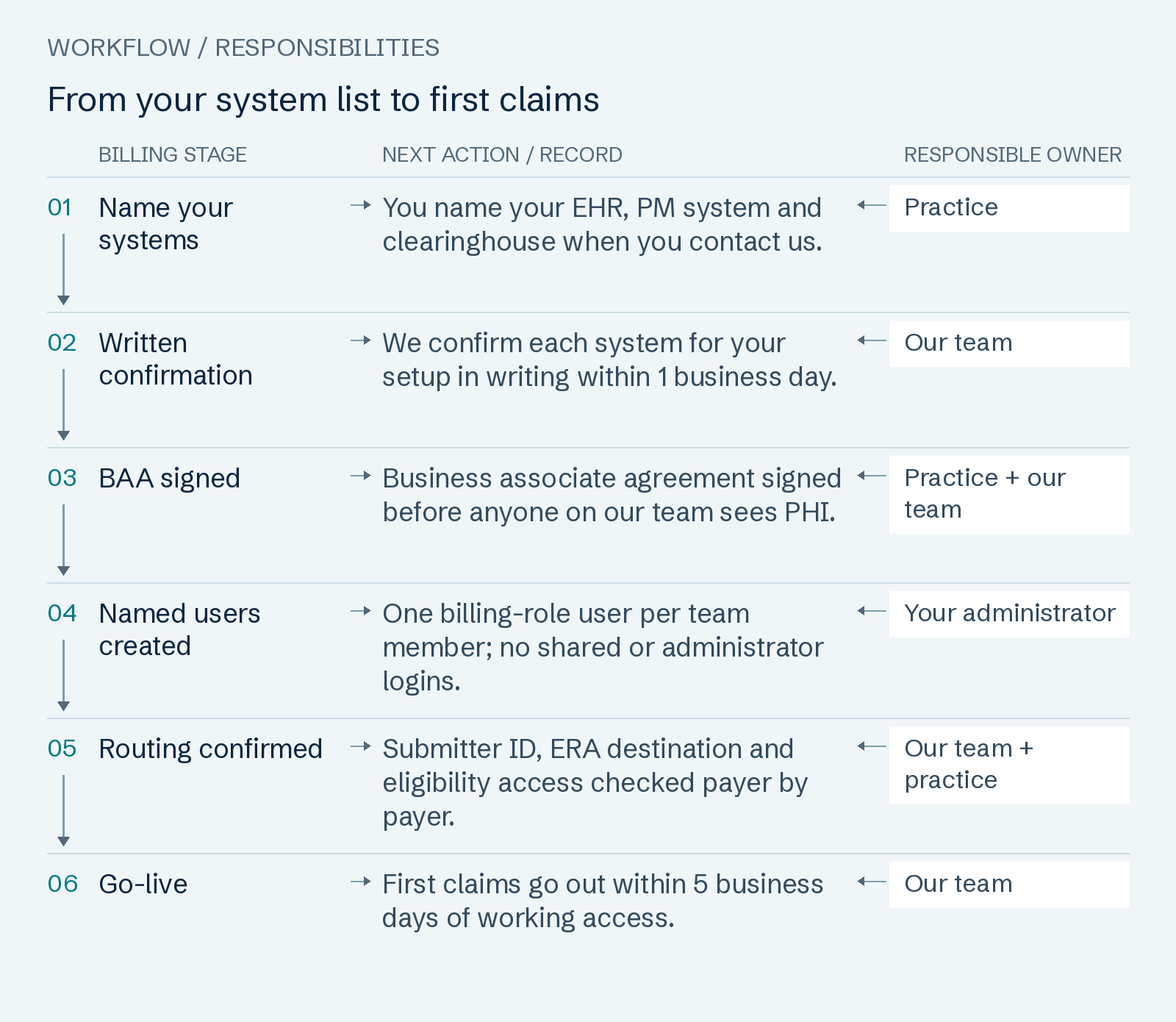
Read the workflow as text
- Name your systems — You name your EHR, PM system and clearinghouse when you contact us. Owner: Practice.
- Written confirmation — We confirm each system for your setup in writing within 1 business day. Owner: Our team.
- BAA signed — Business associate agreement signed before anyone on our team sees PHI. Owner: Practice + our team.
- Named users created — One billing-role user per team member; no shared or administrator logins. Owner: Your administrator.
- Routing confirmed — Submitter ID, ERA destination and eligibility access checked payer by payer. Owner: Our team + practice.
- Go-live — First claims go out within 5 business days of working access. Owner: Our team.
BAA and security steps before any access
A billing company is a business associate of your practice. HHS lists claims processing or administration, data analysis, billing, and practice management among the activities that make a vendor one, and HIPAA lets you share PHI with a business associate if you obtain satisfactory assurances, in the form of a written business associate agreement, that it will safeguard the information (HHS). The BAA is therefore signed before we receive a login, an aging export or a single patient name.
The same rule runs down the chain: HHS rules say a business associate must establish a BAA with its subcontractor before disclosing PHI to the subcontractor. HHS's own examples of business associates include a clearinghouse that converts claims for a provider, so vendors like that answer to you under their own agreements. Our BAA sits alongside those agreements and replaces none of them. Our company page lists the ten provisions our BAA carries, summarised from HHS's sample agreement.
- BAA signed by your practice and by us before any access.
- One named user per team member; no shared credentials.
- Multi-factor sign-in wherever your system or portal offers it.
- Access reviewed with you at kickoff and removed on the exit date.
From your system list to first claims
Go-live, the day your first claims go out under our team, depends on working access more than on which software you run. Go-live, when your first claims go out, comes within 5 business days of access; any unbilled backlog follows within 10 business days of access. Clock starts with your signed agreement, signed BAA and working system logins; it extends day for day while we wait on access.
Your part: Sign the service agreement and BAA, give us logins to your practice-management system and clearinghouse, join one 45-minute kickoff call, sign off encounters so charges are complete, and answer our documentation questions within 5 business days.
Clock-or-Credit Guarantee. From go-live, every new claim goes out within 1 business day of complete charge data, and every denial is worked within 2 business days of posting — or $25 comes off your invoice for each late one. Mon–Fri ET business days by your system's timestamps; worked: resubmitted, appealed or returned with the fix; auto-credited; capped at monthly fee; clearinghouse outages excluded. Because we work inside your system, the timestamps that decide every credit are ones your own team can check.
Rates for each specialty and practice size are on our billing rate card.
Which EHR and PM systems do practices ask about?
Whether you run athenahealth, Tebra, AdvancedMD, eClinicalWorks, Epic, NextGen, DrChrono, CareCloud or a specialty system, the six questions in the table below are the same. Kareo now sits under Tebra, the company formed when Kareo and PatientPop closed their merger in November 2021 (Tebra), so a Kareo question and a Tebra question usually mean the same software. This page names these systems as examples only, not because of any partnership with or endorsement by their vendors.
A name on a vendor list tells you nothing about your plan, your user roles or your clearinghouse. We answer the questions below for your exact setup, in writing, before you sign anything. We work inside your existing practice-management system and clearinghouse; tell us which ones and we confirm in writing within 1 business day.
Specialty systems for therapy, ABA and rehab
Specialty EHRs get the same questions, plus one more: whether the system tracks authorized units or visits, since authorization expiry tracking is part of our billing scope. See how billing differs by practice type in our specialty billing guides, or tell us which systems you use and get the written answer.
| Question we answer in writing | Why it matters to your cash | If the answer is no |
|---|---|---|
| Can your plan add a named user for each biller? | Without one, claim work waits on your staff's logins | You add user seats with your vendor; go-live waits for them |
| Is the clearinghouse built in or a separate contract? | It decides where rejections and acknowledgments appear | Either setup works; we map where each report lands |
| Where does each payer send your ERAs today? | Payments post only from remittances that reach your system | You sign the payer's ERA change; we prepare it |
| Can we read signed notes, or only charges? | Codes are checked against documentation before claims go out | We send coding questions to your clinicians instead |
| Does it export a claim-level aging report? | Old claims are sorted by the deadline each one faces | We agree another export format with you before go-live |
| Are payer portal users issued per person? | Shared portal logins hide who did what | Your portal administrator decides; we never share a login |
What happens to your system access when you leave
Leaving is simpler when your billing never left your system. Your claims, payment history and notes stay in software your practice holds the contract for. On the exit date your administrator disables our users in the PM system, EHR and clearinghouse, and your portal administrators remove ours from each payer portal.
Clean-Exit Terms: Leave with 30 days' notice and no termination fee. Want a run-out? We keep working the claims we submitted for 90 days at your plan rate. Decline it and we charge nothing on payments that post after you leave. Notice by email; optional run-out covers claims we submitted before your exit date, at your plan rate; handover file within 10 business days of exit. The handover file holds: Every open claim with its status and next action, the denial log, payer correspondence and credentialing files, in CSV and PDF.
Practices that also want credentialing, prior authorizations and every scheduled visit verified can compare our Complete RCM plan.
Common questions
- Do you work in our EHR and practice-management system?
- Yes, once we confirm your setup in writing. Billing inside the systems you already license is how we work. We work inside your existing practice-management system and clearinghouse; tell us which ones and we confirm in writing within 1 business day. We do not call any system "supported" until we have checked your plan, your user roles and your clearinghouse.
- Do we have to change software or clearinghouse to work with you?
- No. You keep your EHR, PM system and clearinghouse contracts and pay those vendors directly. Not included in our fee: Your EHR or practice-management subscription and clearinghouse fees (paid to those vendors), any application fee a payer or state charges, mailed patient statements at $0.95 each, and collection-agency, attorney or court costs.
- What access does your billing team need?
- A billing-role user in your PM system, access to signed notes in your EHR, a clearinghouse user, ERA routing for each payer, eligibility access and payer portal users. None is an administrator account. The access table lists the limit on each.
- Do you sign a BAA before getting access?
- Yes, before any login, export or patient name changes hands. HHS lists billing and practice management among business-associate activities, and HIPAA permits sharing PHI with a business associate once you hold its written assurances in a BAA (HHS).
- Will our insurance payments go through you?
- Every payment goes straight to your practice's own bank account. We never receive, deposit or endorse your payments; we invoice you once a month. Only the ERA, the electronic remittance file, is routed to the system we post in; the payment itself still goes to your bank.
- Do you work with athenahealth, Tebra (Kareo), Epic or eClinicalWorks?
- We answer that for your exact plan, user roles and clearinghouse, in writing, rather than from a vendor list. We work inside your existing practice-management system and clearinghouse; tell us which ones and we confirm in writing within 1 business day. The same check applies to AdvancedMD, NextGen, DrChrono, CareCloud and specialty systems. Naming a system here implies no partnership with its vendor.
- How soon can billing start once we send logins?
- Go-live, when your first claims go out, comes within 5 business days of access; any unbilled backlog follows within 10 business days of access. Clock starts with your signed agreement, signed BAA and working system logins; it extends day for day while we wait on access.
Sources and review
Page revised October 7, 2026 · Review contact: Hyder Shah (inquiries@claimpillar.com). The workflow checklists are editorial recommendations; payer requirements depend on the program and current policy.
- HHS OCR: Business Associates
- 45 CFR 164.312: Technical safeguards (eCFR)
- 45 CFR 164.502: Uses and disclosures of PHI, minimum necessary (eCFR)
- First Coast Service Options: EDI enrollment form instructions for providers
- First Coast Service Options: EDI enrollment form instructions for third parties
- CMS: MAC contract award for Jurisdiction N (Florida, Puerto Rico, U.S. Virgin Islands)
- CMS: Health Care Payment and Remittance Advice
- Tebra: Kareo and PatientPop merge to form Tebra (2021)