What AI revenue cycle management means for your practice
AI revenue cycle management is software that learns from claim and payment data, or generates text, to do part of the billing work between a patient's visit and the payment reaching your account. Most products sold under the label mix three things: fixed rules (an edit that stops a claim with a missing field), automation (a bot that checks a payer portal on a schedule) and models that predict or write (a denial-risk score, a draft appeal letter). Ask a vendor which of the three does each job, because only the third behaves differently from the billing software your practice already runs.
What the adoption numbers measure
The adoption figures in AI sales material mostly describe hospitals. The American Hospital Association reports that about 46% of hospitals and health systems use AI in their revenue-cycle operations, according to an AKASA and HFMA Pulse Survey. The same piece says 74% of hospitals are implementing some form of revenue-cycle automation, and that use of AI for revenue cycle work "is limited to specific functions and health care operations." Neither figure describes a solo or small group practice, so read them as context, not as a benchmark for yours.
For a small practice the useful question is narrower: which steps in your own revenue cycle fail because data is missing or follow-up is slow (where software helps), and which fail because of judgment (where it does not). The steps of revenue cycle management stay the same whether a person or a tool performs them; only who checks the work changes.
Where AI works today: eligibility, claim scrubbing, denial triage
AI and automation fit best on high-volume, rule-bound steps where a mistake shows up quickly and a person can check the output. Three steps fit that description in most practices.
Eligibility checks before the visit
Software can run each scheduled patient's coverage check before the visit and flag inactive coverage, a changed plan or a missing referral, so your front desk fixes the problem before a claim exists. A person still resolves each flag: calling the payer when the response is incomplete and telling the patient what they may owe.
Claim scrubbing before submission
A claim scrubber checks each claim against payer edits before it goes out. AHA, citing a 2024 HIMSS report, describes AI that "identifies and corrects claim errors before submission." Keep a person on the fix whenever an edit questions the code or the note rather than a typo, because that fix changes what your practice is billing for.
Denial triage
Sorting denials by reason, dollar amount and appeal deadline is where prediction helps a small team most. AHA describes a Fresno health network whose tool flags claims likely to be denied, based on its historical payment data and payer adjudication rules. Triage sets the order of work; it does not decide whether a denial is right. The causes a front desk can prevent are laid out in how to reduce claim denials at your practice.
| RCM step | What software can do | What a person must still do | Verdict |
|---|---|---|---|
| Eligibility and benefits check | Run the check before the visit; flag inactive or changed coverage | Call the payer on unclear responses; tell the patient what they owe | AI-ready, with review |
| Claim scrubbing | Catch missing fields, mismatched IDs and payer edit failures | Decide the fix when the edit questions the code or the note | AI-ready, with review |
| Payment posting | Post electronic remittances and match them to claims | Work exceptions: underpayments, takebacks, unmatched payments | AI-ready, with review |
| Denial triage | Sort denials by reason, amount and deadline; score denial risk | Choose correct, appeal or write off for each claim | Shared |
| Time and unit counts | Total documented timed minutes into units | Clinician documents the minutes and signs the note | Human-required at the source |
| Coding | Suggest codes from the clinical note | Check each code against the note; clinician signs off on changes | Human-required |
| Appeals | Draft a letter from the denial reason | Build the argument from the record, review and sign | Human-required |
| Payer calls and prior authorization | Submit requests and check status through portals and APIs | Peer-to-peer reviews, escalations, lost corrected claims | Human-required |
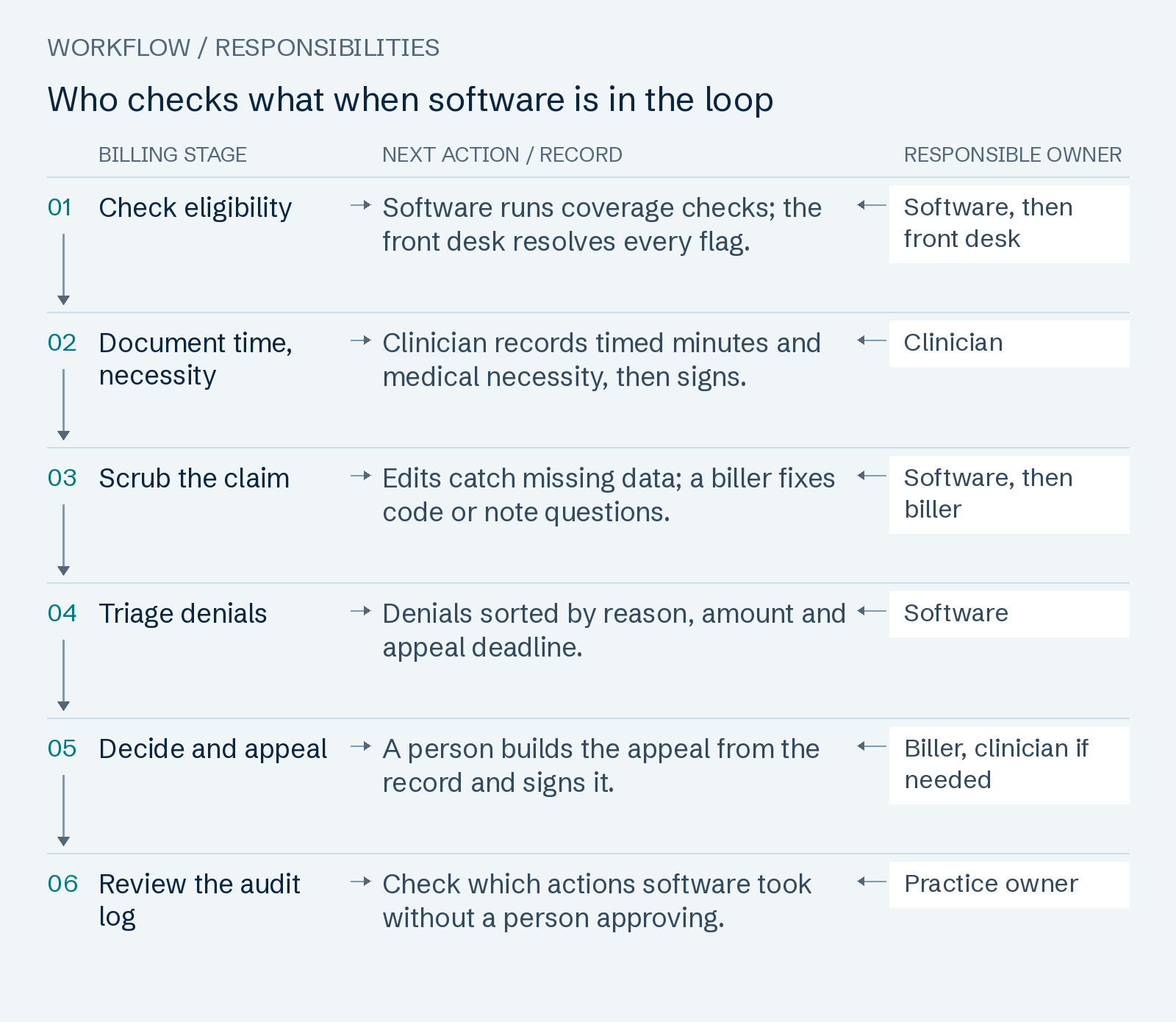
Read the workflow as text
- Check eligibility — Software runs coverage checks; the front desk resolves every flag. Owner: Software, then front desk.
- Document time, necessity — Clinician records timed minutes and medical necessity, then signs. Owner: Clinician.
- Scrub the claim — Edits catch missing data; a biller fixes code or note questions. Owner: Software, then biller.
- Triage denials — Denials sorted by reason, amount and appeal deadline. Owner: Software.
- Decide and appeal — A person builds the appeal from the record and signs it. Owner: Biller, clinician if needed.
- Review the audit log — Check which actions software took without a person approving. Owner: Practice owner.
Where it doesn't: coding judgment, appeals, payer calls
Coding judgment
Tools that suggest codes from the clinical note exist: AHA, citing HIMSS, describes systems that "automatically assign billing codes from clinical documentation." The code still has to match what the note supports, and the claim goes out under your practice's billing number, not the software vendor's. A suggested code is a draft until someone checks it against the documentation and the clinician agrees to any change.
Appeals
Generative AI can draft an appeal letter. AHA reports that Banner Health uses a bot to generate appeal letters based on specific denial codes, and the same piece says more significant generative AI applications, such as improving front-end processes and data validation, are "not yet ready for widespread use." An appeal succeeds on the record behind it: the right note, the authorization, the payer policy that was misapplied. Building that argument, and deciding whether a denial deserves an appeal at all, is judgment work. Ask who does it before you buy, whether from a software vendor or from denial management services.
Payer calls, and payers' own AI
Payers are automating too. Medicare's WISeR model runs from January 1, 2026 to December 31, 2031 in New Jersey, Ohio, Oklahoma, Texas, Arizona and Washington, and uses AI and machine learning alongside clinical review of selected services, which go through either prior authorization or pre-payment medical review. CMS states that "all recommendations for non-payment are determined by appropriately licensed clinicians." Under the CMS interoperability and prior authorization final rule, Medicare Advantage plans, Medicaid and CHIP programs and plans, and federal-exchange health plans must give a specific reason for a denied prior authorization beginning in 2026, and must implement a Prior Authorization API beginning January 1, 2027. Those changes make automated status checks easier. A stuck authorization, a peer-to-peer review or a payer that keeps losing a corrected claim still needs a person on the phone.
AI and therapy billing: time, units and medical necessity
Outpatient therapy and ABA claims are billed largely in time units, which makes them the place where a tool that drafts notes or counts units can do the most damage. Software can only count minutes your clinician actually documented.
Timed units
For Medicare outpatient therapy, the CMS Claims Processing Manual, chapter 5, section 20.2 counts 15-minute timed codes from treatment minutes: one unit for 8 through 22 minutes, two units for 23 through 37, and so on. When several timed services happen the same day, the total timed minutes set the number of units, and "the total number of timed minutes must be documented." For the adaptive behavior codes, the ABA Coding Coalition says 8 to 22 minutes counts as one unit and that "time reported and billed must be face-to-face time with the patient."
Medical necessity
Medicare therapy claims above the KX modifier threshold must carry a modifier confirming the services are "medically necessary as justified by appropriate documentation in the medical record," according to the same CMS chapter. No tool can supply that justification; it has to be in the clinician's note. The ABA Coding Coalition notes that reassessment timeframes are set by payer policy or medical necessity, so a tool needs each payer's rules loaded and someone keeping them current.
Before you let a tool touch timed claims, check that:
- It reads minutes from the signed note, not from the appointment length on the schedule.
- It totals all timed minutes for the day before it assigns units.
- It counts only face-to-face time on ABA claims.
- It stops a claim when units exceed what remains on the authorization.
- A person reviews any note text the tool drafted before the clinician signs it.
Behavioral health groups can set these checks against where behavioral health revenue leaks.
Risks: HIPAA, BAAs and audit trails
Any AI vendor that touches your claims handles protected health information, so HIPAA applies to it before any feature does.
The vendor is a business associate
HHS lists claims processing, billing and practice management among business associate functions in its business associate guidance, and says a provider may disclose protected health information to a business associate only after obtaining "satisfactory assurances," in a business associate agreement, that the business associate will appropriately safeguard it. HHS's cloud computing guidance adds that a cloud provider storing only encrypted health data without the decryption key is still a business associate, and that the two parties "must enter into a HIPAA-compliant business associate agreement (BAA)."
What the BAA must say about your data
Under 45 CFR 164.504(e), the contract must set the vendor's permitted uses of your patients' information, bar any other use or disclosure, require safeguards, require the vendor to report breaches, bind its subcontractors to the same restrictions, and require it to return or destroy the data at termination where feasible. Read the data-use clause against what the vendor plans to do: if it wants to train or tune its models on your claims, the contract you sign has to permit that use.
Audit trails
The HIPAA Security Rule, at 45 CFR 164.312, requires covered entities and business associates to implement mechanisms that "record and examine activity in information systems that contain or use electronic protected health information," and to assign each user a unique name or number. For an AI tool, ask whether the log separates actions the software took on its own from actions a person approved: who changed a code, who sent an appeal, and when.
Questions to ask an AI RCM vendor
Ask these in writing and keep the answers with the contract. A vendor that cannot answer the first three in writing should not receive your claim data. The same questions apply when you compare full-service revenue cycle management companies that advertise AI, and they sit alongside the broader checklist for choosing a billing company.
| Question | Why it matters | What to get in writing |
|---|---|---|
| Will you sign a BAA before any data moves? | HHS treats billing and claims vendors as business associates | A signed BAA, dated before the first data transfer |
| Do you use our data to train or improve models? | The BAA must permit every use the vendor makes of your data | The clause naming permitted uses, and how to refuse model training |
| Which subcontractors and model providers see our data? | Subcontractors must accept the same restrictions as the vendor | A named list, and confirmation each is bound by those terms |
| What does the audit log record? | The Security Rule requires activity records on systems holding health data | A sample log showing user, action, time, and software versus person |
| What is your error rate, and how is it measured? | A percentage means nothing without its definition and sample | The definition, period and practice type behind the number |
| Which actions does the tool take with no person approving? | Unreviewed changes go out under your billing number | A list of automatic actions and the review step for each |
| Who fixes and pays for the tool's mistakes? | Corrected claims and refunds cost staff time and money | Correction, refund and indemnity terms in the contract |
| What happens to our data when we leave? | The BAA must require return or destruction where feasible | Export format, timeline and written confirmation of destruction |
How we use software and people on your claims
This page names no AI tool for our own service, and we do not claim that AI works your claims. What we commit to is in writing. We work inside your existing practice-management system and clearinghouse; tell us which ones and we confirm in writing within 1 business day. The systems we work in are listed on our EHR and practice-management compatibility page. We check every code against your clinician's documentation and never change a code without the clinician's sign-off. Payments posted within 2 business days of the remittance, emails answered within 1 business day, and the KPI report with written definitions by the 10th.
Our revenue cycle management services are priced from 5.0% to 8.5% of insurance payments, with 0% of patient payments and $0 setup. Invoices 1–3: only percentage fees on that month's insurance payments, plus any statements or add-ons you order; the $400 minimum starts with invoice 4. Month to month. Leave with 30 days' written notice. No termination fee. Every rate is on the rate card by specialty and practice size.
If your A/R has aged while you evaluate tools, start with Get my free A/R Deadline Map: A claim-by-claim list of every unpaid insurance claim over 90 days in the aging report you send: payer, amount, the deadline it faces, the denial reason and the next action, sorted by deadline. Clock starts with your claim-level aging export and signed BAA; above 10 requests in a week, we confirm your date within 1 business day.
Common questions
- What is AI revenue cycle management?
- It is software that uses models trained on claim and payment data, or that generates text, to do part of your billing work: eligibility checks, claim edits, denial sorting and draft appeal letters. Most products combine it with fixed rules and bots. It is most dependable on rule-bound steps where a person can check the output, as the task table above shows.
- Can AI replace a medical biller?
- Not for the judgment parts of the job. Software can take over repetitive checks and sorting, but coding against the note, deciding and building appeals, and payer calls still need a person. The AHA piece cited on this page advises health systems to mitigate AI risks by "having humans validate computer-generated outputs to prevent closed-loop automation." Even Medicare's WISeR model leaves non-payment recommendations to licensed clinicians.
- Is AI medical billing HIPAA compliant?
- Compliance comes from the contract and the controls, not the product label. HHS treats a vendor that handles billing or claims data as a business associate, so it must sign a business associate agreement that limits how it uses your data, and the Security Rule requires audit controls on systems holding that data (45 CFR 164.312). Ask for both before any patient data moves.
- Does AI reduce claim denials?
- It can catch some errors before a claim goes out: AHA, citing HIMSS, describes AI that identifies and corrects claim errors before submission. None of the sources on this page gives an independent figure for small practices. Ask a vendor how it defines and measures its denial rate, and compare your own denial rate before and after. Denials that do arrive still need someone to work them, in house or through denial management services.
- What should I ask an AI RCM vendor?
- Start with the BAA, how it uses your data (including model training), which subcontractors see it, and what the audit log records. Then ask how it measures its error rate, which actions run without a person approving, who pays for its mistakes, and what happens to your data when you leave. The vendor question checklist lists what to get in writing for each.
- Do you use AI on our claims?
- We name no AI tool for our service and make no claim that AI works your claims. We work in your existing practice-management system and clearinghouse. We check every code against your clinician's documentation and never change a code without the clinician's sign-off. Our written standards: Payments posted within 2 business days of the remittance, emails answered within 1 business day, and the KPI report with written definitions by the 10th.
Sources and review
Page revised November 4, 2026 · Review contact: Hyder Shah (inquiries@claimpillar.com). Every source was retrieved on November 4, 2026. hhs.gov refused automated requests that day, so the two HHS pages were read from Internet Archive captures (business associate page capture of October 26, 2026, content last reviewed October 21, 2026; cloud computing guidance last reviewed December 23, 2022).
- HHS OCR: Business Associates (HIPAA Privacy Rule guidance)
- HHS OCR: Guidance on HIPAA and Cloud Computing
- 45 CFR 164.504: Uses and disclosures, organizational requirements (business associate contracts), eCFR
- 45 CFR 164.312: Technical safeguards (audit controls), eCFR
- CMS Medicare Claims Processing Manual, Chapter 5 (Part B outpatient rehabilitation), section 20.2
- ABA Coding Coalition: Frequently Asked Questions
- CMS Innovation Center: WISeR (Wasteful and Inappropriate Service Reduction) Model
- CMS fact sheet: Interoperability and Prior Authorization Final Rule (CMS-0057-F), January 17, 2024
- AHA Center for Health Innovation Market Scan: 3 ways AI can improve revenue-cycle management